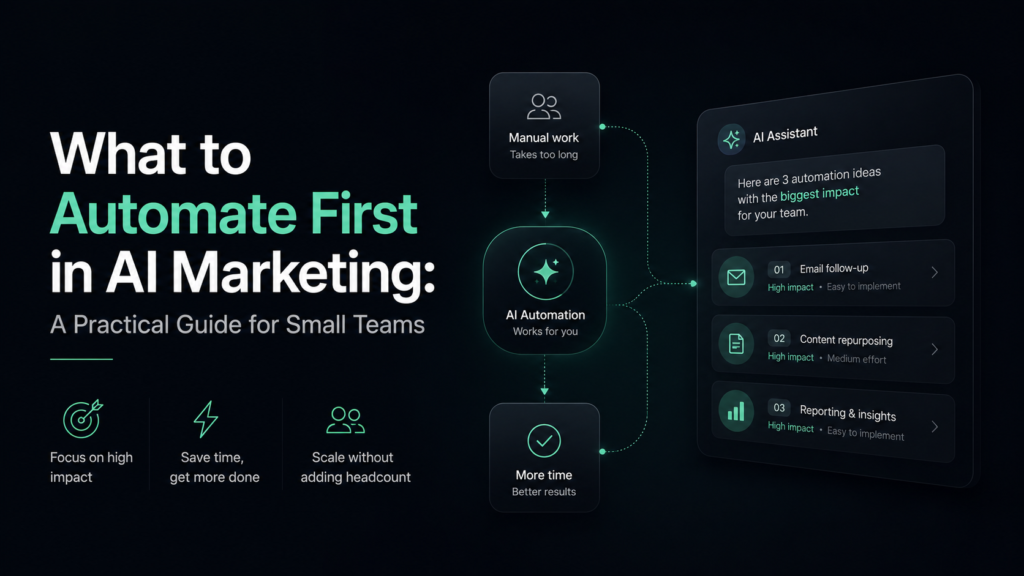
AI marketing automation sounds bigger than it needs to be. Many businesses imagine complex systems, advanced dashboards, chatbot funnels and fully automated campaigns that run without human input.
In reality, the best first automation is usually much simpler.
For most small and mid-sized teams, AI should start with tasks that are repetitive, time-consuming and easy to review. The goal is not to remove people from marketing. The goal is to reduce manual work so people can focus on strategy, customers and better decisions.
At Aisendia, we usually recommend starting with small workflows that solve clear problems. Once those workflows are stable, the business can add more automation step by step.
Start With Tasks That Repeat Every Week
The easiest marketing tasks to automate are the ones your team already repeats often.
These may include checking contact forms, writing similar follow-up emails, summarizing campaign results, preparing content briefs, organizing leads or turning meeting notes into action items.
A task is a good automation candidate if it has a clear pattern. For example, every new lead needs to be reviewed, categorized and answered. Every campaign report needs a short summary. Every blog post needs a topic, outline and draft structure.
AI can help with these repeated steps because the input and expected output are predictable.
A simple rule works well: if your team does the same task every week and the result can be reviewed before use, it may be worth automating.
Lead Summaries Are a Good First Workflow
One practical place to begin is lead handling.
Many businesses receive inquiries through website forms, email, ads or landing pages. These messages may contain useful details, but someone has to read them, understand the request and decide what to do next.
AI can help by creating a short summary of each inquiry.
For example, when a contact form is submitted, AI can identify:
what the person needs;
which service they are asking about;
how urgent the request appears;
whether budget or timeline is mentioned;
what follow-up question should be asked.
This does not replace the sales or marketing team. It simply gives them a cleaner starting point.
Instead of opening a long message and trying to understand it from scratch, the team receives a short summary and suggested next step. That can improve response speed without making communication feel automated.
Email Drafts Can Save Time, But Need Review
Email automation is useful, but it should be handled carefully.
AI can help prepare first drafts for common messages such as:
thank-you emails;
lead follow-ups;
meeting confirmations;
proposal reminders;
newsletter drafts;
re-engagement messages;
customer feedback requests.
The important word here is “drafts.” AI should help prepare the response, but a human should review important messages before sending them.
This is especially true when the message involves pricing, customer complaints, project details, legal topics or sensitive situations. AI may write something that sounds polite but does not match the context.
A safe first workflow is simple: AI prepares the draft, a person approves or edits it, then the email is sent.
That small step can still save time while keeping control in human hands.
Content Planning Is Easier to Automate Than Final Writing
Many businesses want AI to write complete articles, social posts or landing pages. It can help with that, but full content generation is not always the best first step.
A safer starting point is content planning.
AI can help create:
topic ideas;
blog outlines;
content briefs;
headline variations;
FAQ sections;
social post angles;
email campaign themes;
repurposing ideas from one piece of content.
This is useful because planning often takes time, but the output is easy to review. The team can choose the best ideas, remove weak ones and adjust the direction before writing begins.
For example, a business can give AI a list of customer questions and ask it to group them into blog topics. This can turn messy notes into a practical content plan.
The final content should still be edited by a person, but AI can make the planning stage much faster.
Reporting Summaries Are Often Worth Automating
Marketing reporting is another strong use case for AI.
A lot of teams collect data from ads, email campaigns, websites, social media and CRM systems. The problem is not always the lack of data. The problem is turning that data into a short explanation.
AI can help create first-level summaries:
what changed this week;
which campaign performed better;
which traffic source improved;
which email had stronger engagement;
which landing page needs attention;
what should be tested next.
This is helpful because many reports are too long or too technical. AI can make them easier to read.
However, the final interpretation should still be reviewed. AI may notice patterns, but people should decide what those patterns mean for the business.
A good reporting workflow combines automation and judgment: AI prepares the summary, the marketer checks the data, and the team decides what to do next.
Customer Feedback Can Be Organized Faster
Customer feedback is valuable, but it is often scattered across emails, reviews, survey answers, support messages and sales calls.
AI can help organize this feedback into themes.
For example, it can group comments by:
pricing concerns;
feature requests;
service complaints;
common questions;
positive feedback;
reasons people hesitate before buying.
This can help marketing teams understand what customers actually care about. It can also support better content, sales messaging, landing pages and email campaigns.
The key is to avoid treating AI analysis as the final truth. It should help identify patterns, but a human should review the examples and decide what matters most.
What Should Not Be Automated First
Some marketing tasks are too important or too sensitive to automate early.
For example, do not rush to automate:
final campaign strategy;
brand positioning;
customer complaints;
pricing decisions;
public statements;
sensitive client communication;
legal or financial claims;
major creative direction.
These tasks require context, judgment and responsibility. AI can support them with drafts, summaries or alternative ideas, but it should not make the final decision.
Over-automation can damage trust. A customer can usually tell when a response feels careless. A brand can quickly lose its voice if every message sounds like a generic AI draft.
The best AI marketing systems keep people involved where judgment matters.
Build Review Points Into Every Workflow
A useful AI workflow should not be a black box. The team should know where AI is used, what it produces and who checks the output.
For example:
AI summarizes a lead, and the sales manager reviews it.
AI drafts an email, and the marketer approves it.
AI creates a blog outline, and the editor adjusts it.
AI summarizes a report, and the team checks the numbers.
AI groups feedback, and the business owner reviews the themes.
These review points make automation safer. They also make the workflow easier to improve over time.
If the AI output is weak, the prompt can be adjusted. If the summary misses important details, the workflow can be refined. If the team no longer needs a step, it can be removed.
Good automation is not one-time magic. It is a process that gets better with testing.
Start Small, Then Expand
A business does not need to automate ten processes at once. In fact, that usually creates confusion.
A better plan is:
choose one repeated task;
define the input and output;
create a simple AI-assisted workflow;
test it with real examples;
add human review;
measure whether it saves time;
improve the process;
then consider the next workflow.
This approach is slower than the hype suggests, but it is much more reliable.
The goal is not to look advanced. The goal is to build marketing systems that save time and still protect quality.
How Aisendia Helps
Aisendia helps businesses choose the right first automation instead of chasing every new AI tool.
We review the current marketing process, identify repeated tasks, map the workflow and decide where AI can help safely. Then we help design practical systems for content, lead handling, reporting, email drafts, feedback analysis or campaign planning.
The focus is always the same: useful automation, human review and clear business value.
AI should make marketing easier to manage. It should not make the team feel less in control.
Conclusion
The best first AI marketing automation is not the most impressive one. It is the one your team can use every week.
Lead summaries, email drafts, content planning, reporting summaries and customer feedback organization are strong places to start. They are practical, repeatable and easy to review.
Tasks like strategy, sensitive communication, brand judgment and final approval should stay human.
Used this way, AI marketing automation becomes less intimidating. It becomes a set of small improvements that help the team move faster without losing control.
If your business wants to find the right first AI marketing workflow, Aisendia can help you review your process and build a practical starting plan.
Contact Aisendia to discuss AI marketing automation, content workflows and AI tool selection for your business.