Webmasters today are expected to manage more than they were a few years ago: content updates, technical SEO, page speed, mobile responsiveness, security basics, and a steady stream of small client or stakeholder requests that all compete for the same limited hours. AI tools have started filling some of those gaps, but the useful ones are the ones that solve a specific, recurring piece of the workload — not the ones promising to replace the whole job.
uKit AI is a good example of a tool built around one specific task: taking an outdated website and generating a modernized version of it automatically. At Aisendia, we think the more useful question isn’t whether a tool like this is impressive in isolation. It’s where it actually fits into a webmaster’s broader toolkit, alongside the other systems already doing the rest of the work.
Start With the Task It Actually Solves
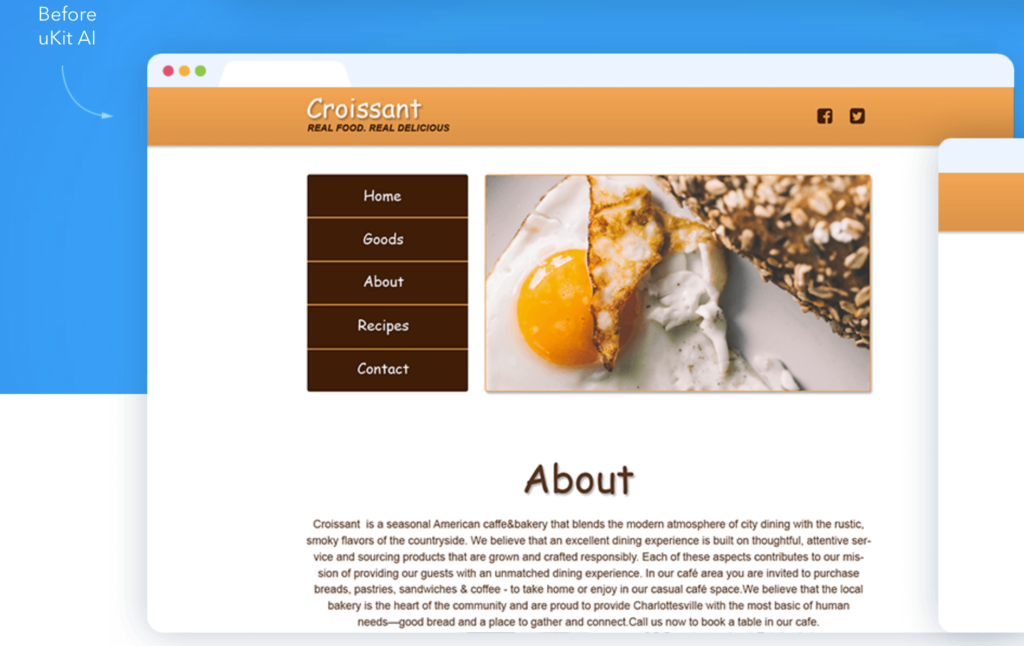
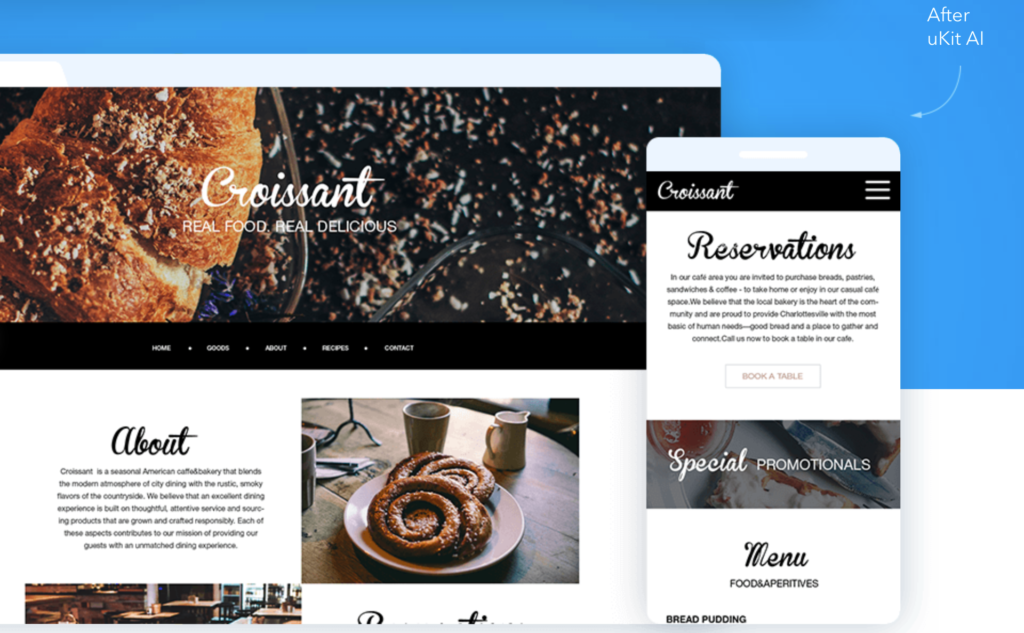
uKit AI analyzes an existing site and produces an upgraded version — modern layout, mobile-responsive design, HTTPS, cleaner markup — typically within about ten minutes, ready for review before publishing. That is a narrow, well-defined task, and narrow tasks are exactly where AI tools tend to deliver the most reliable value.
For a webmaster managing multiple sites or client relationships, this kind of tool is most useful as a triage step. Instead of manually auditing every outdated site to decide whether it needs a light refresh or a full rebuild, running it through an AI redesign tool produces a concrete reference point fast. That reference point makes the next conversation — with a client, a stakeholder, or your own team — much easier to have, because everyone is reacting to something real instead of a hypothetical.
Where It Fits Into a Client-Facing Workflow
For webmasters and small agencies handling multiple client sites, uKit AI works best as an early stage in a larger process, not as the final deliverable.
A practical workflow looks like this:
A client mentions their site feels outdated.
You run it through an AI redesign tool to generate a fast reference draft.
You review the draft together, using it to anchor a conversation about what to keep, what to change, and whether a full custom redesign is actually justified.
If the AI-generated version is close enough, you refine it and move toward launch. If the client needs more brand-specific work, you have a starting point instead of a blank page.
This shortens the distance between “the client thinks something should change” and “there is something concrete to react to,” which is often the slowest part of a redesign engagement.
For more on how to think about introducing AI into a workflow without losing control over quality, see our guide on How AI Helps Marketing Teams Work Faster Without Losing Human Control.
What Should Stay Manual
Not every part of a redesign belongs in an automated tool, and a good toolkit is built around knowing where to draw that line.
Content accuracy should stay manual. An AI redesign tool modernizes presentation, not facts. Service descriptions, pricing, and business details still need a human pass to confirm they’re current, regardless of how good the new layout looks.
Brand positioning should stay manual. A modernized template can still describe a business in terms generic enough to apply to several competitors. Deciding what makes a specific business worth choosing is strategic work that sits outside what any redesign tool — AI-powered or not — is built to solve.
Platform decisions should stay manual. Tools built around a specific CMS generally keep the result within that ecosystem. Whether that tradeoff makes sense for a given client depends on their long-term plans, and that’s a judgment call, not a default to accept automatically.
Build Review Points Into the Workflow
A useful AI-assisted redesign process should not be a black box between “submit a URL” and “publish the result.” The webmaster or team should know exactly where AI is doing the work and where a person checks it.
For example:
AI generates the modernized layout, and the webmaster reviews it for technical accuracy.
AI carries over the existing content, and a person checks it for accuracy and relevance before publishing.
AI produces a draft structure, and the client or stakeholder reviews it for brand fit before sign-off.
These review points are what make the workflow safe to rely on repeatedly. Without them, speed turns into risk — a fast result that goes live with outdated claims or generic positioning baked in, simply because nobody checked.
Start With One Workflow, Then Expand the Toolkit
The mistake we see most often with AI adoption in any part of a business — webmastering included — is trying to automate everything at once instead of proving out one workflow first. A more reliable approach:
Pick one recurring task — in this case, triaging outdated sites for redesign.
Define what the AI tool should produce and what a human needs to check afterward.
Test it on a real site, not a hypothetical one.
Add the review step before treating the output as final.
Measure whether it actually saves time compared to the manual process.
Only then consider where else in the webmastering workflow a similar AI-assisted step might fit — content drafts, basic SEO checks, performance audits, and so on.
A redesign-triage tool like uKit AI is a strong first candidate for this kind of test, because the task is specific, the output is easy to review, and the time savings are immediately obvious compared to a fully manual audit.
How Aisendia Helps
Aisendia helps small teams and businesses figure out where AI actually belongs in their day-to-day workflows, rather than adopting every new tool that promises to change everything. For webmasters and the teams that support them, that often means treating tools like uKit AI as one piece of a larger system — useful for triage and fast first drafts, paired with clear review steps for content accuracy, brand positioning, and platform decisions.
The goal isn’t to remove the webmaster from the process. It’s to remove the slowest, most repetitive part of it so the time saved goes toward the decisions that actually need a person.
Conclusion
uKit AI fits a modern webmaster’s toolkit best as a fast, narrow tool for one specific job: turning an outdated website into a modernized reference draft in minutes instead of weeks. It is not a replacement for content strategy, brand positioning, or platform decisions, and treating it as one workflow step among several — with clear review points — is what makes it genuinely useful rather than just fast.
The same start-small principle applies here as it does across marketing automation generally — for a practical breakdown of what to tackle first and what to leave for later, see What to Automate First in AI Marketing: A Practical Guide for Small Teams. If your team wants help figuring out where AI tools like this fit into your own website or content workflow, Aisendia can help you map the process and find the right starting point.